Prerequisites
Make sure the following software is installed on your system:
- Docker
- Docker Compose
You can visit the official Docker website to get the installation guide.
Set Up the Project
1. Create a Project Folder
First, create a new folder in your desired location, which will be used to store the Docker configuration files:
mkdir meting-api
cd meting-api
2. Create the Docker Compose File
In the meting-api folder, create a file named docker-compose.yml and paste the following content:
version: '3.8'

services:
  meting:
    image: intemd/meting-api:latest
    container_name: meting
    ports:
      - "3000:3000"
    restart: always
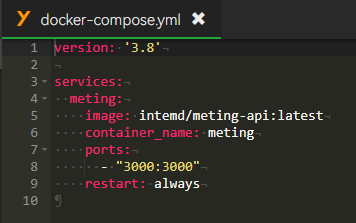
intemd/meting-api:latest image. The service maps port 3000 to port 3000 in the container and is set to always restart.
3. Save the File
Make sure the docker-compose.yml file has been saved correctly.
Run Docker Compose
In the directory containing the docker-compose.yml file, open a terminal or command-line tool and run the following command to start your Meting-API container:
docker-compose up -d
This command starts the Meting-API service in the background.
Configure Reverse Proxy Rules
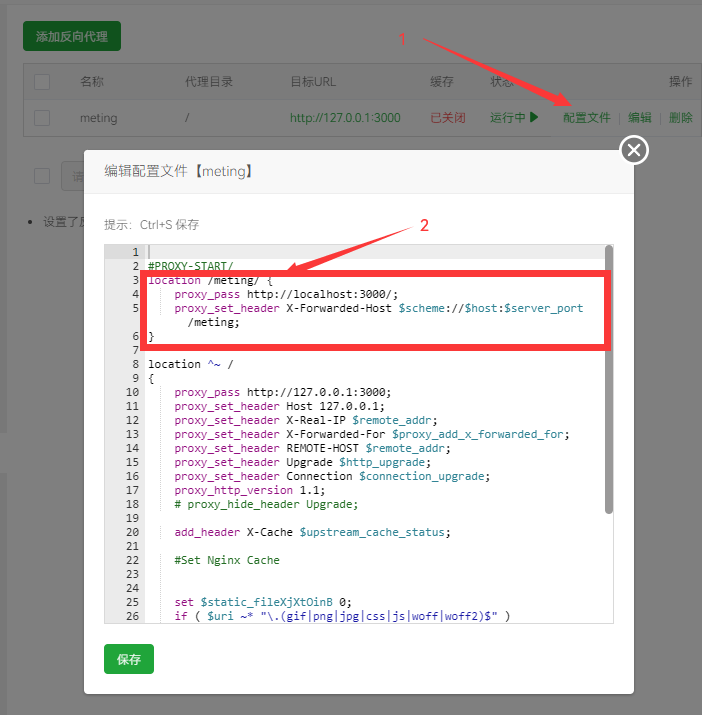
Add the following rules to your reverse proxy configuration file
location /meting/ {
    proxy_pass http://localhost:3000/;
    proxy_set_header X-Forwarded-Host $scheme://$host:$server_port/meting;
}
Frequently Asked Questions
Change the Port Number
If you need to change the external port exposed by the container, simply modify the ports section in docker-compose.yml. For example, change the port to 4000:3000.
View Container Logs
To view the container logs, you can use the following command:
docker-compose logs